Traffic analysis using Synchro often involves reviewing detailed output reports to assess intersection performance. While Synchro provides comprehensive results, extracting Level of Service (LOS) data and organizing it into a clean, report-ready table can be a time-consuming step, especially for larger networks.
This guide outlines the typical process for extracting LOS tables from Synchro reports and presents an efficient approach for streamlining this workflow.
If you’re looking for a faster way to generate clean LOS tables from Synchro outputs, you can try this browser-based tool here: Synchro TXT to Table Conversion Tool
Understanding Synchro Output Reports
Two methods are typically used when extracting reports from Syncrho; 1 PDF reports in Synchro’s format, and .txt files.
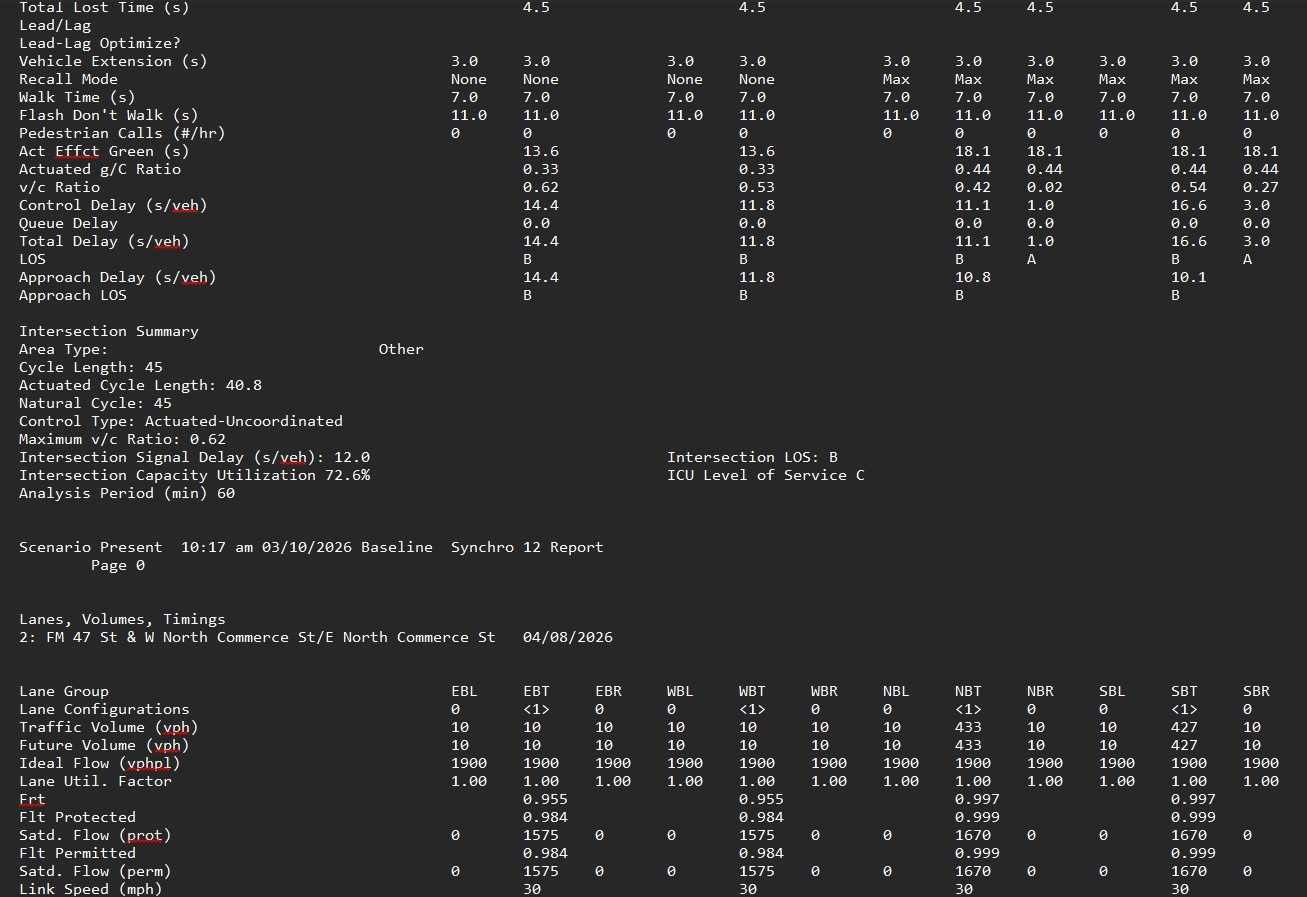
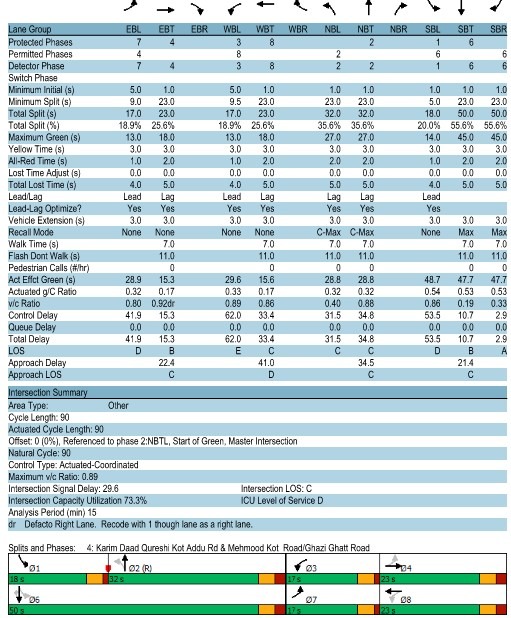
Synchro .txt reports contain detailed information for each intersection, including:
- Intersection Geometry
- Volume Data
- Timing Data
- Level of Service (LOS)
- Volume-to-Capacity (V/C) ratios
- Control delay
- ICU (for certain control types)
- Movement-level performance
These reports are structured in sections and often span multiple pages per intersection, depending on control type (Signalized, TWSC, AWSC, or Roundabout).
While the data is comprehensive, it is not immediately formatted for use in Traffic Impact Studies (TIS) or technical reports. It is also useful as an Appendix rather than a clean summary table to insert into analysis chapters.
Traditional Workflow for extracting LOS Tables from Synchro
In practice, most traffic engineers don’t work directly from Synchro text reports. Instead, the typical workflow involves reviewing the Synchro network visually, moving intersection by intersection, identifying performance measures, and manually summarizing results for reporting.
While this approach works for small networks, it quickly becomes cumbersome as projects scale. When dealing with multiple intersections, scenarios, and analysis horizons, the process becomes:
- Time-consuming
- Repetitive
- Prone to human error
It’s also worth noting that Synchro .txt reports, while comprehensive, are rarely used directly in practice. These files often contain far more than just performance metrics, information that reviewes do not need to immediately see. As a result, they can be lengthy and difficult to navigate when all you need is a clean summary of key performance indicators.
Existing Methods for Extracting Synchro LOS Data
Some firms have developed internal Excel macros to extract data from Synchro reports. These solutions have been used for years and can be effective, but they still involve multiple manual steps:
- Open Excel
- Run the macro
- Select the Synchro
.txtfile - Configure settings
- Generate the table
- Copy results into reports
- Repeat for each file
While functional, this workflow still adds friction, especially when handling multiple scenarios or large networks.
Challenges with Extracting LOS Tables from Synchro
For small models, this process is manageable. However, for larger networks or multiple scenarios, several challenges arise:
- Time-intensive: Each intersection must be reviewed individually
- Repetitive: Similar steps are repeated across projects
- Risk of omission: Movement-level data can be missed
- Formatting inconsistencies: Tables may vary between reports
- Limited visibility: Identifying critical intersections requires manual scanning
If this workflow feels familiar, there are tools available that can automate this step entirely—converting Synchro .txt outputs into clean, report-ready LOS tables in seconds. View the tool
A Faster Way to Extract LOS Tables from Synchro
A browser-based tool removes much of this overhead.
Instead of switching between applications and repeating steps, you can:
- Upload a
.txtfile directly - Instantly generate a formatted LOS table
- Copy results into Word or Excel
Because it lives in your browser, it’s always accessible, no setup, no macros, no repetition. For frequent Synchro users, this can streamline the overall workflow while reducing the chance of errors.
Try the Synchro LOS Table Tool
If you regularly work with Synchro outputs, you may find it useful to test this approach on your own projects.
You can access the tool here:
https://www.arterials.co/synchro-txt-to-table-conversion-tool/
It’s designed as a lightweight utility, something you can bookmark and use whenever you need to quickly review or summarize intersection performance.
When This Approach Works Best
This type of workflow is particularly helpful when:
- Reviewing multiple intersections across a network
- Comparing scenarios or analysis horizons
- Preparing Traffic Impact Studies or technical reports
- Quickly identifying critical movements (e.g., high V/C ratios or failing LOS)
Rather than replacing engineering judgment, the goal is simply to reduce the time spent extracting and formatting data—so more time can be spent interpreting results.
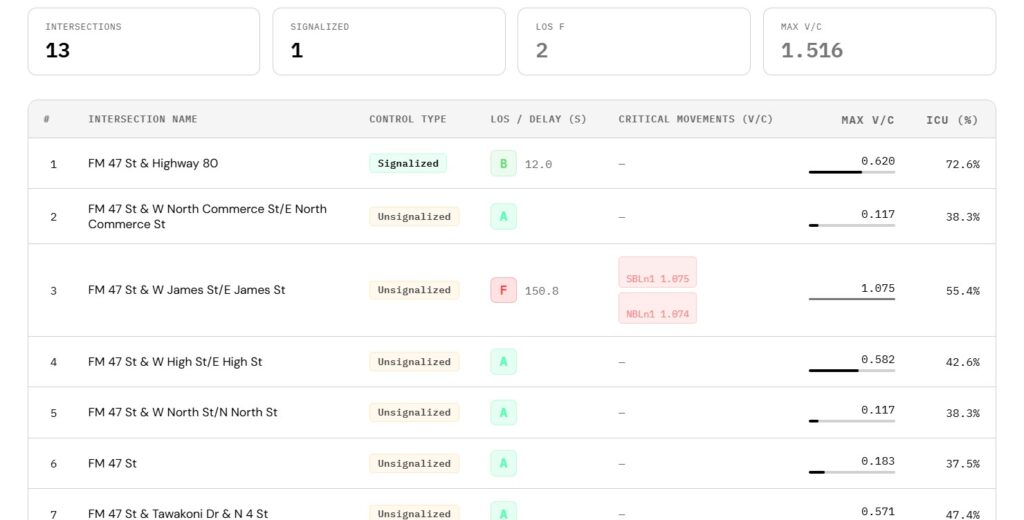
Example Output
The generated table includes:
- LOS values (color-coded) for quick interpretation
- V/C ratios at the movement level
- Identification of critical V/C values based on user-defined thresholds
- Flags for oversaturated movements (V/C > 1.0)
- Organization by Node ID and intersection name
The output is formatted for direct use in:
- Microsoft Word
- Microsoft Excel
- Traffic Impact Study reports
Benefits of Using Structured LOS Tables in Synchro Analysis
Using a structured output table allows for:
- Faster identification of failing or critical intersections
- Improved visibility of problematic movements
- Consistent formatting across projects
- Reduced manual effort during report preparation
This approach is particularly useful when working with large Synchro networks or multiple analysis scenarios.
Access the Synchro LOS Table Tool
If you regularly work with Synchro reports, you can try the tool here:
https://www.arterials.co/synchro-txt-to-table-conversion-tool/
Conclusion
Extracting LOS tables from Synchro reports is a necessary step in many traffic engineering workflows. While the manual approach remains viable, it can become inefficient as project complexity increases.
Automating this step helps streamline both analysis and reporting, allowing more time to focus on interpretation and decision-making.
Are you working with a Left-Hand-drive network like England, Japan, Pakistan, or India? Read this tutorial on how to use Synchro for such networks