Synchro, a traffic signal optimization and simulation software by Trafficware (now part of Cubic), is only in right-hand drive (RHD) orientation, so its a common problem for traffic engineers analysing networks in Left hand drive countries, making them default to other software such as SIDRA or Vistro.
Why Synchro is Preferred Despite RHD Limitation
Synchro is still preferable as a powerful and globally accepted tool for traffic engineers, due to its precise signal timing optimization and detailed intersection analysis features. Its intuitive interface, integration with simulation tools like SimTraffic, and compliance with key standards such as the Highway Capacity Manual (HCM), Highway Safety Manual (HSM), and other international guidelines make it an ideal and trusted solution for evaluating and improving traffic flow worldwide.
How to use Synchro in Left Hand Drive Networks
Here’s a clear, step-by-step guide on how to use Synchro for left-hand drive (LHD) road networks, such as those found in the UK, Australia, India, Pakistan, South Africa, and several other countries.
Preparing Satellite Imagery for Synchro Left Hand Drive Modelling
Before you open Synchro, get a satellite Imagery of your study intersection or subject road network from Google Maps, Bing Maps, or Google earth and save a screenshot of it as a picture (JPEG, PNG are fine).
Open the image in a picture editor like MS Paint, MS Photos or any other tool, and flip the image horizontally. Now the intersection in the image is in Right Hand Drive orientation with the North-South as it is, and east west directions flipped around. But we worry about that later.

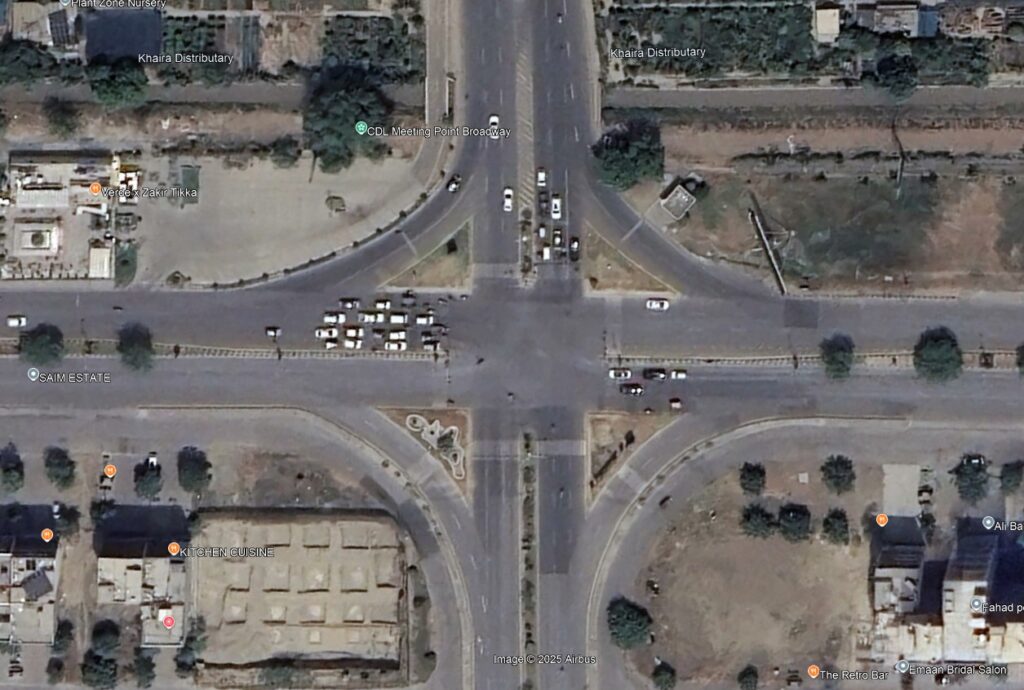
Save the image.
Step-by-Step Synchro Workflow for LHD Roads
Import Flipped Image to Synchro
Open Synchro, and add the background image, centered and scaled as you usually would.

Draw the road network
Now that the basemap is laterally inverted, the base road network image you see should be in a right-hand-drive orientation. Now you can draw your road network over it with Synchro’s default orientation. The Lane configurations are also entered the same way, matching what is seen in the flipped image.

Labeling Approaches Without Relying on Directions
Given that the network is flipped, Northbound Left is now northbound right, eastbound right is now westbound left, and its all going to become super confusing when you enter your traffic volume data and adjust your timings. So to avoid confusion, DO NOT THINK OF OF YOUR NETWORK IN THESE TERMS NOW. Forget about it. There are no northbounds or anybounds or rights or lefts.
Instead, label the approach links to your intersections with some known nearby reference locations.

In the above example, each end is labelled as “Hospital”, “Stadium”, “Casino”, “Town Hall” to indicate what is the origin or destination of a given link. The same reference locations should be used for your traffic count data and volumes should be read as “From Town Hall to Casino”.

In Synchro, the corresponding turning movement may be northbound right, but it does not matter what it is as long as the volumes of the turning movement are coming from the Town Hall and turning towards the Casino. The same logic should be applied on all the turning movements, From X to Y.
The same strategy is then used for the signal timing data.
Conduct Synchro Analysis
Continue with all your Synchro Analysis as you normally would. Only you know that everything is flipped around. You can optimize timings, adjust lane configurations, run your SimTraffic Simulations, and export results as you normally would.
Final Tips: Reporting and Image Editing for LHD Output
This may be the most tedious part of the process; presenting your analysis in a report or client presentation. You will have to export your images as screenshots and flip everything background. But now your volume text would be inverted, which would be annoying to clean up.


The Synchro and traffic engineering part is over, now the photo editing part begins. You are own your own for that.
Conclusion
While Synchro was originally designed for right-hand drive networks, with the right approach and a few clever workarounds—like flipping imagery and using location-based labels—it can be effectively adapted for use in left-hand drive countries. This guide provides a practical method to maintain the powerful benefits of Synchro, even in settings where left-hand traffic is the norm. If you need assistance with traffic modeling, signal optimization, tailored training, or professional traffic engineering services, don’t hesitate to contact us—we’re here to help you get the most out of your tools and data.