
To get the best results from Arterials AI Traffic Counting Software, proper video capture is important. While the AI is capable, the quality of the input video directly affects detection accuracy and counting performance. Click here to see examples of good and bad videos for vehicle detection.
Recommended Video Specifications
To ensure accurate results with Arterials AI Traffic Counting Software and improve computer vision detection, use videos that meet the following Specifications:
- Resolution: 1080p or higher
- Frame rate: 30fps or higher
- Camera height: 15 ft min – 40 ft max (No drones or helicopters!)
- Camera angle: Slightly top-down for clear vehicle detection. The roofs of the vehicles and road should be visible.
- Stable fixed position: Avoid moving, zooming, or panning cameras
- Wide field of view: Capture all approaches and lanes clearly
- Obstruction-free view: No poles, trees, signs, or vehicles blocking sight
- Avoid shadows and glare: Ensure consistent lighting, preferably daytime
- Supported formats: MP4, MOV, AVI
- QA verification: Always check annotated outputs to confirm vehicle counts
Continue reading to see details and examples of both good and bad footage.
Best Traffic Video Capture Practices
Clear Views, No Obstructions
- Ensure the camera has an unobstructed view of the intersection.
- Avoid poles, trees, signs, or vehicles blocking approaches.
- Clear views improve detection accuracy and reduce the chance of missed or misclassified vehicles.


Frame Rate: At Least 30fps
- Record videos at 30 frames per second or higher.
- Most modern smartphones, action cameras, and dashcams meet this requirement.
- Higher frame rates improve AI performance by capturing vehicles in more frames. There is however a trade off with processing time if the frame rate become very high.


Camera Height: 15–40 ft
- Position the camera high enough to see the roofs of vehicles clearly.
- Too low may obstruct the view of turning movements; too high (e.g. drone footage) may make vehicles appear very small.
- If your footage is captured from a greater distance, consider cropping or zooming before processing to keep vehicles and their shapes visible and detectable by the Ai.


Wide Field of View for Intersection Segmentation
- The video should cover the intersection wide enough to draw approach lines and turning movement lines with sufficient separation.
- Proper spacing between lanes and movements helps the AI detect vehicles and classify turning movements accurately.


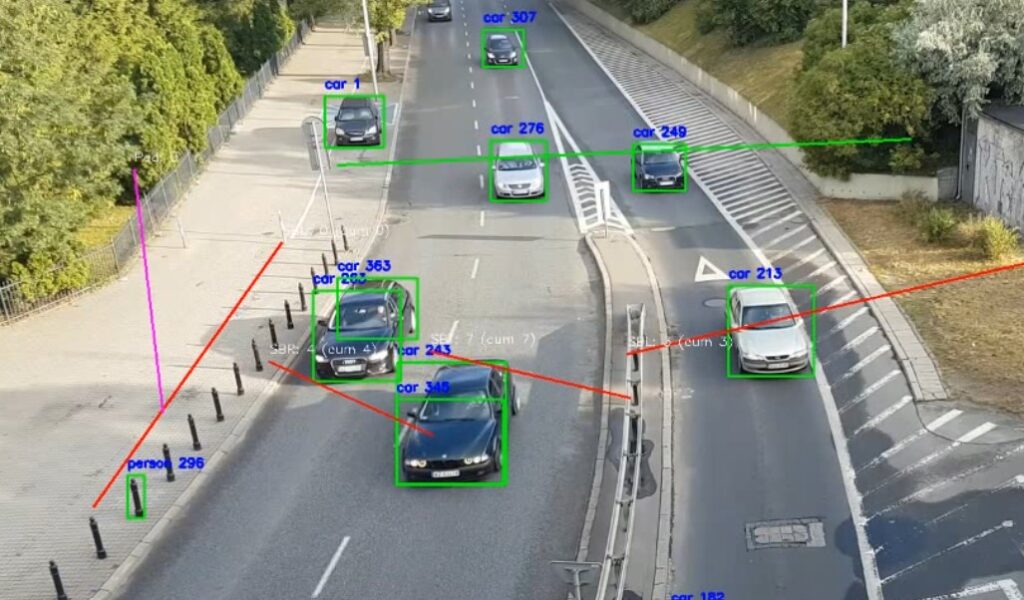
Use QA Annotated Outputs to Verify Counts
- AI detection is not perfect. Results vary based on video clarity, lighting, and camera angle.
- Review the annotated QA video outputs to confirm detected vehicles, movement lines, and classifications.
- Better-quality videos help the AI provide more reliable outputs.
FAQ
Q: What if my lens isn’t wide enough to capture the whole intersection?
A: Use two cameras and either stitch the video in a video editor before processing, or process both videos separately and combine the Excel outputs.
Q: My video appears black when I try to draw lines. what do I do?
A: The line drawing canvas uses the first frame of your video. Make sure the first frame shows actual footage (not fading in from black or blank). If needed, trim the video to start at the visible frame.
Q: Trucks are being classified as trains. Is this a bug?
A: Trucks are usually detected correctly. Some edge cases, such as double tanker trucks, or trucks tailgating eachother, may be classified as trains. Use the annotated QA outputs to verify counts. Future AI model updates may improve detection accuracy further.
Q: How long does it take to process a video?
A: Processing time depends on the video length, frame rate, your hardware, and whether a GPU is used. As a guideline, estimate roughly 5–10 minutes of processing per minute of video.
Q: What video formats are supported?
A: MP4, MOV, AVI. For best results, we recommend 720p or higher resolution and 30fps or higher.
Summary
The right kind of traffic video footage helps the Arterials AI Traffic Counting Software produce more reliable detection and counting results. Follow these recommendations for camera height, frame rate, field of view, and unobstructed views. Always use the annotated QA video outputs to confirm counts and classifications.
Pro Tip: Test a 5-10 minute clip before processing a several hours long video file.
By capturing your own video under these conditions, you maximize the software’s capabilities and ensure results that are as accurate and actionable as possible.
Download the Arterials Ai Traffic Counting Software
Register your Software or Renew Your License
Video Height, Angle, width Examples for Ai assisted Vehicle Counting


